Reverse Song & Voice Challenge
- 4.1
- Rating
- 10.00M
- Installs
- Free
- Price
 Analysis by App-foxy
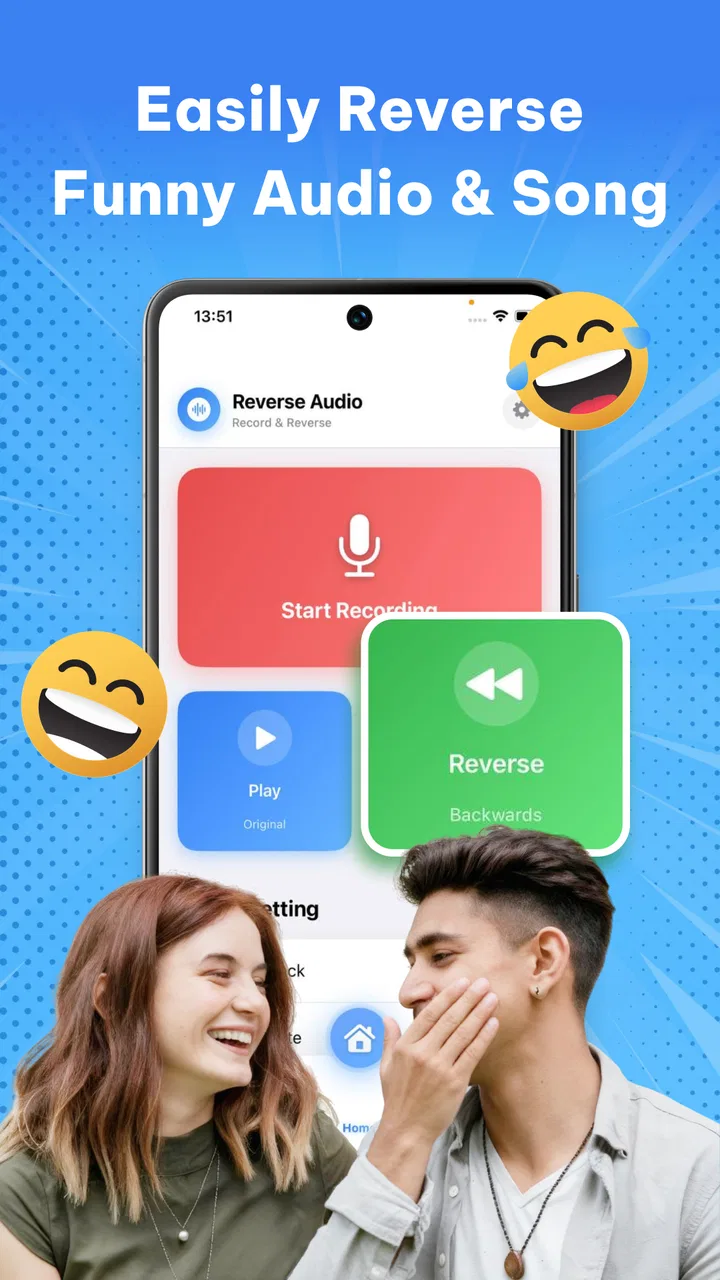
I found Reverse Song & Voice Challenge most interesting as a quick audio experiment rather than a full music-making tool. The basic idea is easy to understand: record or choose a voice or song, reverse the sound, and listen for the strange result. That makes it a natural fit for short challenges, playful conversations, and casual singing practice. I also think its value depends heavily on what you expect from a music and audio app. If you want a simple way to hear familiar sounds from an unusual angle, it can be entertaining. If you need careful editing, polished recording controls, or a serious practice environment, it feels much more limited.
The app comes from DATAX POWER and is free to install, with optional purchases ranging from $3.99 to $39.99 per item. It is rated for Everyone, which matches the lighthearted concept, and it runs on Android 7.1 or later. Its average rating is 4.5 from around 59 thousand ratings, while the app has passed one million installs. Those figures suggest that the reverse-audio idea has broad appeal, but they do not change the central question I would ask before installing it: do you enjoy experimenting with sound more than managing it?
How the experience feels to use
I find the experience easiest to enjoy when I treat each recording as a small listening puzzle, not a performance to perfect. A short phrase, a clear voice, and a quiet moment make the transformation more satisfying than a long clip recorded in a noisy room. That quick, low-pressure appeal is a good starting point; the next question is whether the surprise still feels worthwhile after the first few tries.
You May Also Like

 Pandora - Music & Podcasts
Pandora’s Music Is Easy to Start, but Harder to Recover
Pandora’s strength is its low-effort path from a seed to a station. Its weak spot is how much confidence it asks you to place in connection, setup, and quiet recovery.

 AccuWeather: Weather Radar
AccuWeather Review: A Quick, Clear Forecast for Everyday Decisions
For everyday plans, the best forecast is the one you can understand quickly. AccuWeather makes rain timing, radar, and local conditions easy to act on, with a few trade-offs.

 Hill Climb Racing
Why Hill Climb Racing Still Turns Crashes Into One More Run
A tiny car, a bumpy hill and one more upgrade: Hill Climb Racing keeps resurfacing because its simple chaos makes every near-miss feel personal.

 AliExpress - Shopping App
AliExpress Makes Global Shopping Feel Personal, but Shoppers Bear the Risk
AliExpress turns a global marketplace into a pocket-sized discovery engine. Its reach is useful, its shopping loop compelling, and its trade-offs easy to miss.

 Lords Mobile: Kingdom Wars
Lords Mobile Is a Kingdom-Building Routine, Not a Quick Match
A case-by-case verdict on the building, battles, device demands, and social commitments that make Lords Mobile rewarding for some players and exhausting for others.

 PDF Scanner app - TapScanner
TapScanner Makes Paperwork Easier to Capture, Check, and Share
TapScanner makes scanning with a phone feel less like a rescue operation and more like a dependable step in getting work done. Its capture tools are useful, though not flawless.
More From Our News Desk
View All News


Readable navigation for a quick audio experiment
The strongest part of the concept is that the main action does not need much explanation. A reverse challenge is immediately understandable, even for someone who has never used an audio editor. That simplicity matters when the app is shared with a friend or opened during a short break. I would not want to study a complicated manual before trying a joke recording, and this kind of app works best when the path from opening it to hearing a result feels short.
The interface is also easier to approach than a conventional recording workstation. Traditional music apps often place waveforms, tracks, trimming handles, effects panels, and export controls in the same space. Those tools are useful when precision matters, but they can make a casual experiment feel like work. Here, the reverse concept gives the session a clear purpose. I can focus on the sound rather than learning a full production workflow.
That simplicity has a trade-off. A focused interface can be friendly for first-time users, but it may leave experienced audio users wanting more control. I would not choose this as my main tool for arranging a song, correcting a vocal take, or preparing a finished recording. The app is better understood as a playful layer placed over audio, not as a replacement for a conventional editor.
For a reader deciding whether it is suitable for children or mixed-age groups, the Everyone rating is reassuring in a general sense. The idea is easy to explain without technical language, and the challenge format can work for people who are not confident singers. Still, I would introduce it as a sound game rather than promise a structured learning activity. The enjoyment comes from discovery and surprise, not from a formal lesson plan.
Useful ways to make the reverse effect more enjoyable
One practical tip is to begin with short, clearly spoken phrases instead of a long song. A brief sentence makes it easier to notice how individual sounds change when played backward. It also reduces the frustration of waiting through a recording that does not produce an interesting result. I found that the most amusing experiments usually came from exaggerated pronunciation, sustained vowels, or a deliberately dramatic singing voice.
A second useful approach is to treat the recording as a listening puzzle. After reversing a phrase, try to guess which original sounds created the result, then record another version with a different rhythm. This turns a one-tap novelty into a small activity that can be repeated without needing extra equipment. It is especially suitable for a family setting or a casual challenge between friends, where the goal is participation rather than perfect audio quality.
A third insight is that the app can be used as a low-pressure singing prompt. Someone who feels uncomfortable singing a complete song may be more willing to record a tiny fragment when the result will be transformed. The reverse effect takes attention away from performance judgment and toward curiosity. That does not make it a vocal coach, but it can help a hesitant user start experimenting with their voice.
Motor and sensory considerations
The app’s basic concept can support users who prefer short, clearly defined interactions. Recording a small clip and listening to the result is less demanding than navigating a large multitrack project. For someone with limited patience for dense controls, that narrow focus may be a genuine advantage. I also like that the experience does not require musical theory; a user can participate through speech, humming, or a simple vocal sound.
At the same time, audio-only interaction creates its own barriers. A person with hearing loss may not receive the full benefit from a reverse listening challenge, particularly if the experience depends mainly on noticing subtle changes in a song or voice. Visual feedback can help in many audio apps, but I would not assume that a waveform or any other visual representation makes the result equally accessible. Anyone who relies on captions, transcripts, or strong visual cues should test the app personally before treating it as an inclusive group activity.
Users with sound sensitivity may also want to approach it carefully. Reversed audio can feel unfamiliar, sharp, or unsettling, especially when played loudly or through headphones. I recommend starting at a low volume and using short recordings. That is not a criticism unique to this app; it is a sensible precaution whenever an application transforms familiar sound into something unpredictable.
For people with motor difficulties, the short-session design may be easier than a detailed editor, but ease will depend on the size and spacing of the controls on the individual device. I would not claim that the app provides specialized switch access, voice control, or other assistive options without testing those arrangements directly. A user who needs reliable alternatives to tapping should verify that the ordinary controls work with their preferred accessibility setup.
Where it fits in everyday situations
I can picture using it during a relaxed gathering. One person records a familiar phrase, another listens to the reversed version, and everyone tries to identify the original. The activity does not need a prepared playlist or musical skill, so it can include the friend who sings confidently and the friend who would rather speak. Keeping each turn short helps the session remain funny instead of repetitive.
It can also work as a private creative break. After a tiring day, I might record a sentence about what I am doing, reverse it, and use the result as a tiny listening challenge. The appeal is not productivity; it is the change of perspective. Ordinary speech becomes unfamiliar enough to invite attention, which can make the app feel more engaging than simply replaying a recording.
Another possible use is informal pronunciation exploration. A language learner could record a short word or phrase, listen to the transformed version, and then compare different recordings for rhythm and emphasis. This should not be confused with pronunciation correction, because reversing a sound does not tell you whether the original pronunciation was accurate. However, it can encourage careful listening to syllable length and vocal energy.
For content creators, the app may be useful as a source of quick audio ideas. A reversed vocal fragment can inspire a transition, a joke, or a behind-the-scenes clip. The limitation is that a creator who needs dependable file handling, detailed timing, or repeatable production settings will probably be more comfortable in a dedicated audio editor. I see this app as a sketchpad for an idea, not the final stage of a professional workflow.
Remaining barriers and practical trade-offs
The biggest barrier is expectation. The store summary presents an instantly transformed experience, but a user looking for a complete music utility may interpret that promise too broadly. Reversing a voice or song is a single creative effect, not the same as editing a track from start to finish. Before installing, I would decide whether the novelty itself is enough to justify another audio app on the phone.
There is also a possible cost boundary for frequent users. The app is free to use at the entry level, while optional items can cost between $3.99 and $39.99 each. I would explore the basic experience first and avoid assuming that every tool or effect is included without checking the purchase screen. For a one-time joke, paid extras may not be worthwhile. Someone who returns often may judge them differently, depending on how much additional variety they provide.
Audio quality is another consideration. A transformed recording is only as enjoyable as the original capture. Background noise, distance from the microphone, room echo, or an overly quiet voice can make the result harder to appreciate. I would record in a calm space, keep the phone reasonably close, and use headphones only after checking the volume. These small habits improve the experiment without requiring technical knowledge.
Privacy-conscious users should also make their own comfort decision before recording personal conversations, children, or other people’s voices. I would avoid capturing anything sensitive simply because the effect is amusing. The safest use is a short, intentional recording made by people who understand what is happening. That is good audio-app practice in general, but it matters more when the app encourages spontaneous group challenges.
People who need predictable, quiet, or highly structured interaction may want to skip it. The reversed result is intentionally unusual, and the entertainment depends on surprise. Likewise, a musician who wants pitch correction, layered tracks, exact cuts, or detailed mixing should choose a conventional music editor instead. A standard voice recorder is also better if the only goal is to capture a clear message without transformation.
An inclusive verdict for the right audience
My view is that Reverse Song & Voice Challenge succeeds when it stays small, social, and experimental. It gives beginners a clear reason to record something, and it can make singing or speaking feel less intimidating because the final sound is not presented as a serious performance. The Everyone rating supports its broad, casual positioning, while the Android 7.1 minimum makes it usable on older compatible devices.
I would recommend it to families, friends, curious singers, and creators who want a fast source of unusual audio ideas. I would be more cautious recommending it to people who depend on strong visual alternatives, need advanced accessibility support, or expect a complete music production environment. The app can be approachable without being universally accessible, and a simple interface does not remove the challenges of hearing transformed audio or operating touch controls.
Its current version is 4.9, and the app’s popularity indicates that the central gimmick has found an audience. Still, the rating and install count are less important to me than the fit between the tool and the user. I would install it for a short, low-pressure challenge, test the free experience, keep the volume modest, and decide quickly whether the reverse effect remains entertaining after the first few attempts.
In the end, this is a focused audio toy with genuine creative uses, not an all-purpose music solution. Its best quality is the way it lowers the barrier to playful recording: you do not need to sing well, understand editing, or prepare a complicated project. Its main weakness is the same narrow focus, because users seeking control, accessibility options, or polished production will outgrow it quickly. For the right person, however, the most valuable feature is the invitation to listen differently—and that is enough to make a free trial worthwhile.
FAQs for Reverse Song & Voice Challenge
01What is Reverse Song & Voice Challenge and how does it work?
Reverse Song & Voice Challenge is an entertaining app that allows users to record their voice or a song and play it backwards. This feature can be used for fun challenges with friends or to create unique audio content. The app processes the recording and provides the reversed version instantly.
02Is Reverse Song & Voice Challenge free to use?
The app offers a free version with basic functionalities. However, there might be in-app purchases or subscriptions available to unlock premium features such as advanced editing tools, removal of ads, or additional sound effects. Users can choose based on their needs and budget.
03What platforms does Reverse Song & Voice Challenge support?
Reverse Song & Voice Challenge is available for both Android and iOS devices. Users can download the app from the Google Play Store for Android devices or the Apple App Store for iOS devices. Ensure your device meets the necessary system requirements for optimal performance.
04Can I share my reversed audio creations on social media?
Yes, the app includes options to easily share your reversed audio clips on various social media platforms such as Instagram, TikTok, and Facebook. After creating your audio, simply use the share feature within the app to post directly to your preferred platform.
05Are there any privacy concerns with using Reverse Song & Voice Challenge?
The app requires access to your microphone to record audio. It’s important to review the privacy policy to understand how your data is used and stored. Ensure that you are comfortable with the permissions requested by the app before downloading and using it.
Pros
- Fun and engaging gameplay experience.
- Easy to use interface for all ages.
- Large selection of songs to reverse.
- Supports sharing recordings with friends.
- Offers creative challenges and modes.
Cons
- Limited free song selection.
- Ads can be intrusive at times.
- Requires internet for full features.
- Sound quality can vary on devices.
- Might not support all audio formats.

Reverse Song & Voice Challenge
Gallery